


I have no textures...
|
same problem... been watching/reading about it since yesterday. it's been over 24 hours, can ggg at least acknowledge this? i suggest all affected by this leave a steam review, sometimes this is the only way to get your voice heard.
|

|
|
Well, unplayable this league start with this bug, see all in 0.5.
|
|
|
Same happened to me, bug report ID: 999 521 471
The game lagged for a split second and everything changed to this.  Edit: the img for some reason does not work here is a link https://imgur.com/DKrIhIc Последняя редакция: Cantharis#5974. Время: 13 дек. 2025 г., 15:21:58
|

|
|
Ok I've managed to consistently bypass this issue. It is not ideal.. But it is something until GGG fixes it.
So from what we've all gathered, we just have to prevent the VRAM from hitting 3GB or higher. Tuning all GFX settings to as low as you can. Enable your framegen. Max Image Quality to Ultra Performance. And the most painful setting. Put to fullscreen, adjust down the resolution to 720P. I got mine to 2.8 consistently. |
|
|
I have the same problem
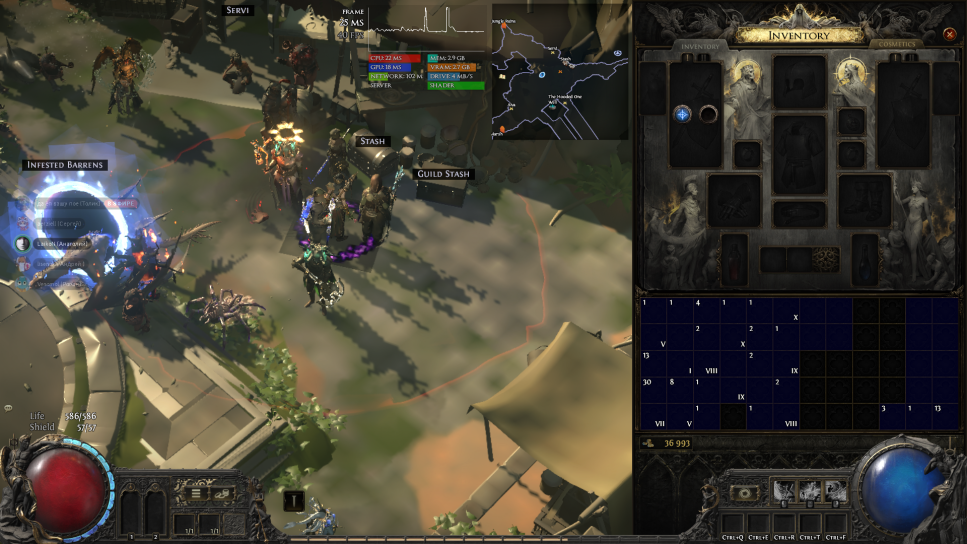 my pc gtx 1650 i5-9400f ram 16gb During the game, my video card is loaded no more than 15% at minimum settings of POE 2, but this does not help to see the textures. |

|
|
same
|
|
|
Bump.
3 pages on first page of reddit have same issue. No way GGG were unaware of this. If this was happening to ps5 users the patch would never have gone live. |
|
|
So... seems like it affects Linux and Windows users. Interesting. I'm used to problems since I'm not playing on an offically supported platform. No biggy, I can play, but it's awkward. Especially not seeing the items.
Bird lover of Wraeclast
Las estrellas te iluminan - Hoy te sirven de guía Te sientes tan fuerte que piensas - que nadie te puede tocar |

|
|
Скрытый текст
I don't know if it will help, but it worked for me. I closed the Epic app and the Deezer app. The texture came back right away, and I've been using it for a while now with no further problems.
Последняя редакция: Aslem#7970. Время: 13 дек. 2025 г., 17:12:09
|

|
" I'm seeing the same. Set dynamic resolution = off, upscale mode = NIS, then changing Render Resolution will fix this, or cause it depending on where you set it. Some areas might have more vram usage, so this might not work everywhere. |
|



